

You created a website, published your pages, added keywords and waited for visitors to arrive.
But weeks or even months later, you are still asking the same frustrating question:
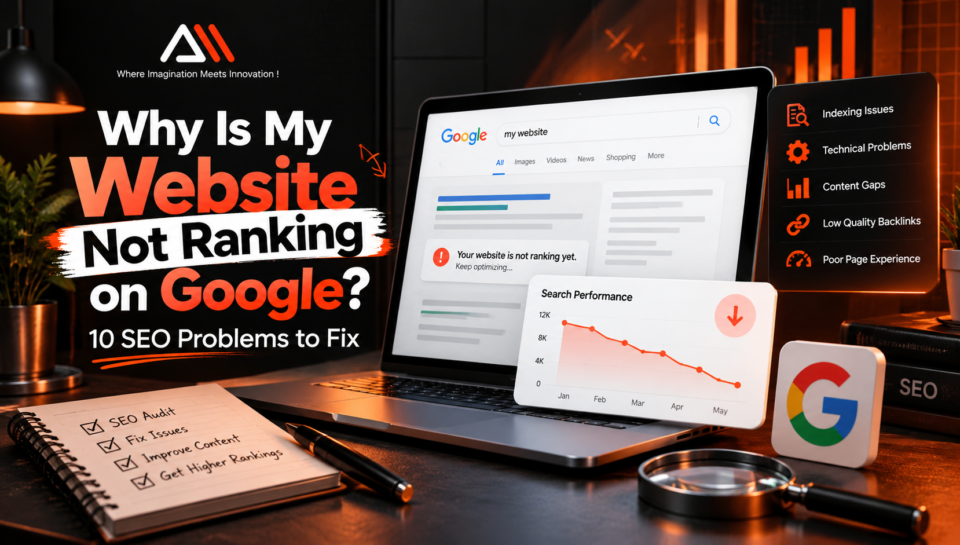
Why is my website not ranking on Google?
You are not alone. A website can look professional and contain useful information but still struggle to appear in search results. Sometimes the problem is technical. Sometimes Google has not indexed the page. In other cases, the page is indexed but does not match what people are actually searching for.
The important thing is not to start changing everything at once.
If your website is not ranking on Google, you first need to identify why. Once you know the real problem, SEO becomes much easier to approach.
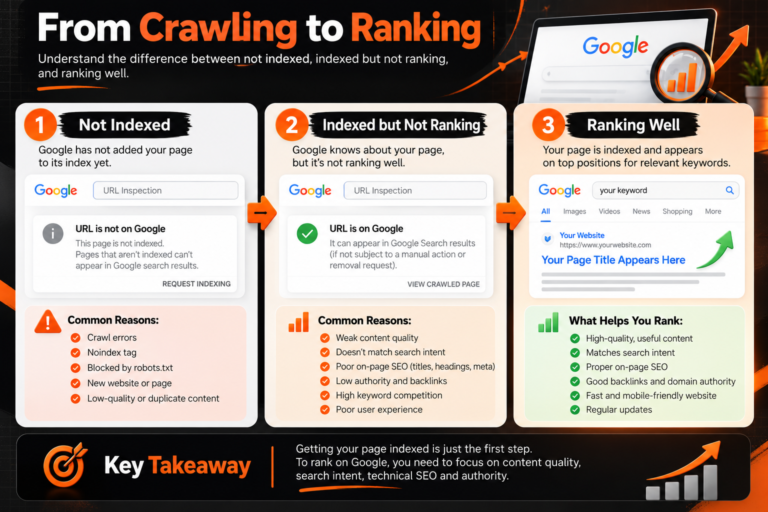
There is also an important difference between not being indexed and not ranking well.
An indexed page is stored in Google’s index and may be eligible to appear in search results. However, being indexed does not guarantee a high position. Google selects results based on relevance, quality and many other signals. Google for Developers
This guide explains 10 common SEO problems that may be holding your website back—and, more importantly, what you can actually do about them.
1. Your Pages Are Not Indexed by Google
Before worrying about rankings, answer one question:
Can Google actually find and index your page?
If Google has not indexed a URL, changing its title or adding more keywords will not solve the fundamental problem.
A page may have indexing problems because of crawling restrictions, a noindex directive, canonicalization, duplicate content, accessibility issues or quality considerations.
How to check your indexing status
Use Google Search Console and open URL Inspection.
Enter the complete URL you want to check.
Google’s URL Inspection tool can show information about the indexed version of a URL, whether the page may be indexable, its canonical information, and other details. You can also test the live URL and request indexing after fixing a problem. Google Help
If several pages are affected, investigate your sitemap, internal links, robots directives and Page Indexing report instead of requesting indexing for every URL one by one.
Advanced fix
Do not stop after seeing “URL is not on Google.”
Find the reason.
For example, check:
- Is crawling allowed?
- Does the page contain noindex?
- Is Google selecting another URL as canonical?
- Can Google discover the page through internal links?
- Does the page return the correct HTTP status?
- Is the page substantially different and useful compared with other pages?
Google makes an important point: even if a live URL test says a page can be indexed, that does not guarantee Google will actually index it. Google Help
So repeated “Request Indexing” clicks are not an SEO strategy. Fix the underlying issue.
2. You Are Targeting the Wrong Search Intent
A website not ranking on Google may be targeting keywords that do not match what users actually want to find.
Imagine someone searches:
“best CRM software for small business.”
They probably want comparisons and recommendations—not a page that simply says, “We develop CRM software.”
Both pages may contain the words CRM software, but they satisfy completely different needs.
That is search intent.
Before creating or optimizing a page, search your target keyword and study what Google is already showing.
Are the results mostly:
- tutorials,
- product pages,
- service pages,
- comparison articles,
- local businesses,
- category pages,
- or informational guides?
That tells you a lot about what searchers are trying to accomplish.
Advanced fix: map one intent to one page
Create a simple keyword-to-page map.
For every important keyword, decide which URL should satisfy that search.
For example:
“what is WordPress” → informational article
“WordPress development services” → service page
“WordPress website cost” → cost guide
This prevents multiple pages from accidentally competing for the same purpose and helps you build a clearer site structure.
If you are building or improving a WordPress website, you can also explore Arsln Mak’s WordPress website development services.
3. Your Content Is Not Better Enough to Deserve the Ranking
One of the most common SEO mistakes is thinking:
“My competitor wrote 1,500 words, so I will write 2,500.”
More words do not automatically mean better content.
Ask a more useful question:
What will a visitor learn or accomplish on my page that they could not easily get from the other results?
Google’s guidance emphasizes creating helpful, reliable, people-first content rather than content created mainly to manipulate search rankings. It also encourages demonstrating genuine expertise and providing useful value to your intended audience. Google for Developers
Weak content often has these problems
It repeats information already available everywhere.
It answers the main question only after a long introduction.
It covers many headings but explains none of them properly.
It makes claims without evidence.
It has no examples, experience, original analysis or actionable steps.
Or it is written around a keyword instead of around the reader’s problem.
Advanced fix: build an information-gain layer
After writing your first draft, do not immediately publish it.
Read the top results for your target query and ask:
“What useful thing is missing from all of these?”
Then add something genuinely valuable.
That could be:
- a troubleshooting checklist,
- screenshots,
- original examples,
- a decision framework,
- common mistakes you have observed,
- before-and-after results,
- a process,
- an original comparison,
- FAQs based on real customer questions,
- or first-hand experience.
This is how content becomes more than another rewritten search result.
4. Your On-Page SEO Is Sending Weak Signals
Good content still needs clear structure.
Google needs to understand what your page is about, and users need to understand it quickly too.
Your primary topic should naturally appear in important areas such as the page title, main heading and relevant content. Google specifically recommends using words people would use to search for your content in prominent locations. Google for Developers
Review:
SEO title: Is it specific and descriptive?
H1: Does it clearly describe the page?
Headings: Do they organize the information logically?
URL: Is it understandable rather than unnecessarily complicated?
Images: Do relevant images have useful descriptive alt text?
Internal links: Are related pages connected naturally?
Content: Does it actually satisfy the query promised by the title?
Google also recommends descriptive, concise page titles rather than vague or unnecessarily verbose ones. Google for Developers
Don’t confuse optimization with repetition
Suppose your target keyword is website not ranking on Google.
You do not need to write:
Website not ranking on Google? If your website is not ranking on Google, our website-not-ranking-on-Google guide…
That sounds terrible to a human and it is not good SEO.
Google explicitly identifies unnaturally repeating phrases in an attempt to manipulate rankings as keyword stuffing. Google for Developers
Use the exact keyword where it makes sense, then use natural related language throughout the article.
5. Technical SEO Problems Are Blocking Your Progress
If your website is not ranking on Google despite publishing helpful content, technical issues may be preventing search engines from accessing important pages.Sometimes the content is not the real problem.
The website itself is.
Technical SEO helps search engines access, crawl, understand and process your website correctly.
Potential problems include:
- important pages blocked from crawling,
- accidental noindex tags,
- broken internal links,
- incorrect canonical tags,
- redirect chains,
- duplicate URLs,
- 404 pages,
- broken sitemaps,
- JavaScript rendering problems,
- poor mobile implementation,
- or server errors.
Google’s developer guidance recommends checking how Google sees a page through tools such as URL Inspection and also stresses that websites should be secure, fast, accessible and work across devices. Google for Developers
Advanced fix: audit templates, not just individual URLs
This is where many SEO audits go wrong.
If 80 pages have the same technical issue, fixing each page separately wastes time.
Ask whether the problem comes from:
- a WordPress template,
- an SEO plugin setting,
- a global canonical rule,
- navigation structure,
- a theme,
- a server configuration,
- or a reusable component.
Fixing the source of the problem can repair dozens or hundreds of URLs at once.
6. Your Website Provides a Poor Page Experience
A visitor clicks your result.
The page takes too long to load.
The layout suddenly shifts.
They tap a button, but nothing happens immediately.
A giant popup covers the content.
They leave.
That is not the experience you want.
Google recommends looking at page experience holistically rather than obsessing over one score. Its current guidance includes Core Web Vitals, secure delivery, mobile display, avoiding excessive distracting ads and intrusive interstitials and making the main content easy to identify. Google for Developers
Pay attention to Core Web Vitals
The current Core Web Vitals include:
LCP (Largest Contentful Paint): loading performance.
INP (Interaction to Next Paint): responsiveness.
CLS (Cumulative Layout Shift): visual stability.
Google’s documented “good” targets are LCP within 2.5 seconds, INP under 200 milliseconds and CLS below 0.1. Google for Developers
But do not fall into the trap of thinking a perfect performance score guarantees position #1.
It does not.
Google explicitly says good Core Web Vitals alone do not guarantee top rankings. Google for Developers
Advanced fix
Instead of installing five more “speed optimization” plugins, identify what is actually slowing the site down.
Look for oversized hero images, unused JavaScript, heavy third-party scripts, unnecessary plugins, poor caching, slow hosting, excessive DOM complexity and render-blocking resources.
Fix the largest bottleneck first.
7. Your Internal Linking Structure Is Weak
A great article hidden five clicks deep in your website is harder for both users and search engines to discover.
Internal links connect related content and help establish the structure of your site.
Google recommends creating crawlable links and using anchor text that helps people and Google understand the destination page. It also warns against forcing excessive keywords into anchor text. Google for Developers
A practical internal-linking strategy
Suppose your website offers WordPress development.
Instead of publishing unrelated articles, create a connected topic cluster:
Main service: WordPress development
↓
Supporting content: WordPress cost
↓
WordPress SEO
↓
WordPress speed optimization
↓
WooCommerce guides
↓
WordPress maintenance
These pages can naturally link to each other where useful.
This creates context instead of a collection of isolated blog posts.
For example, someone researching website development may benefit from Arsln Mak’s professional WordPress development service, while someone requiring a more customized application can explore its full-stack Laravel development solutions.
8. Your Website Has Not Built Enough Authority
You can optimize titles, headings and keywords perfectly and still struggle against established competitors.
Why?
Because SEO is not limited to what happens on your page.
Links and mentions from relevant websites can help search engines discover content and understand relationships across the web. But this is one area where businesses often choose shortcuts.
Buying large batches of low-quality links, participating in manipulative link exchanges or creating links purely to influence rankings can create more problems than benefits. Google’s spam policies specifically address link spam. Google for Developers
Build links people have a reason to give
Instead of asking, “Where can I buy 100 backlinks?” ask:
“What could we publish that another website would genuinely want to reference?”
Examples include:
- original research,
- industry statistics,
- useful free tools,
- templates,
- detailed case studies,
- expert commentary,
- original graphics,
- calculators,
- or genuinely comprehensive resources.
Digital PR, partnerships, industry publications and relevant business directories can also create legitimate visibility.
One relevant editorial mention can be more valuable strategically than a spreadsheet full of meaningless links.
9. You Are Competing for Keywords You Are Not Ready to Win
This problem is easy to overlook.
Imagine a new marketing website publishing one article and immediately targeting:
“SEO”
It may be competing against enormous platforms, established agencies, educational websites and publications with years of content and authority.
The article might be good.
The keyword strategy is the problem.
Advanced fix: calculate ranking feasibility before writing
Before choosing a keyword, inspect the search results.
Look at:
Intent: What kind of page is ranking?
Specificity: Is the keyword broad or focused?
Competitors: Are the results dominated by major authoritative websites?
Content quality: Can you genuinely provide something better or more useful?
Business relevance: Would ranking for this term attract the right visitor?
A smaller website can often make faster progress by targeting specific problems.
Instead of:
SEO
try a topic such as:
why is my website not ranking on Google
Instead of:
WordPress
target a specific question, problem, comparison or purchase decision.
Build topical depth first. Then gradually compete for broader terms.
10. You Publish Content and Then Forget About It
Publishing is not the end of SEO.
It is the beginning of the feedback loop.
Search behaviour changes. Competitors improve their pages. Products change. Links break. Statistics become outdated. Search results evolve.
A page that performed well two years ago may slowly lose visibility even if nothing is technically “broken.”
Use Search Console as a decision-making tool
Instead of updating every old article randomly, use performance data.
Look for pages with:
High impressions but low clicks
The topic has visibility, but the title or search-result presentation may need improvement.
Queries ranking near the first page
These may offer realistic optimization opportunities.
Declining clicks or impressions
Investigate whether the content has become outdated or competitors now satisfy the intent better.
Queries you never intentionally targeted
These can reveal new sections or supporting articles worth creating.
This is a much more intelligent strategy than changing content because “it has been six months.”
What Should You Fix First If Your Website Is Not Ranking on Google?
Do not try to solve all ten problems on the same day.
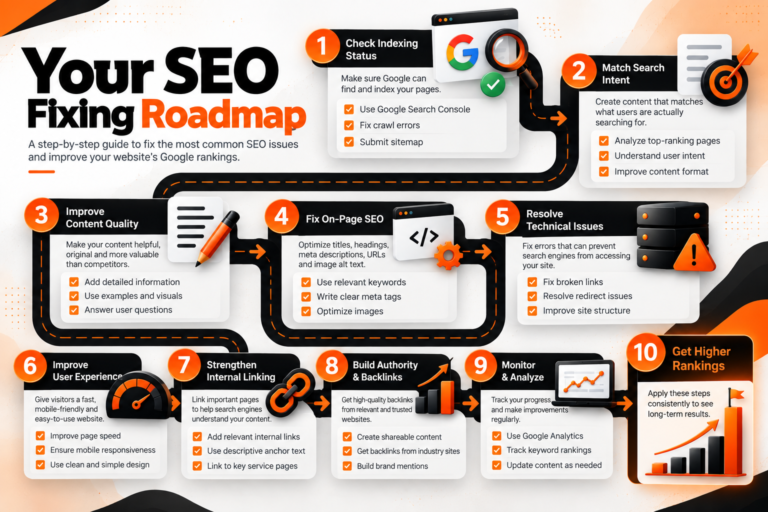
Use this order:
Step 1 — Check indexing.
Confirm that Google can access and index the important URL.
Step 2 — Check search intent.
Make sure your page type actually matches the query.
Step 3 — Evaluate the content.
Ask whether the page provides a complete and genuinely useful answer.
Step 4 — Review on-page SEO.
Improve the title, headings, structure, internal links and relevant page elements.
Step 5 — Audit technical SEO.
Investigate crawlability, canonicals, redirects, status codes, sitemap and mobile rendering.
Step 6 — Check performance and UX.
Improve real bottlenecks rather than chasing a perfect score.
Step 7 — Strengthen internal linking.
Step 8 — Build authority naturally.
Step 9 — Reconsider keyword difficulty and intent.
Step 10 — Measure the result and improve again.
That order matters.
There is little value in chasing backlinks for a page Google cannot index, and there is little value in improving page speed if the content answers the wrong search intent.
A Simple SEO Diagnostic Framework
Here is a useful way to think about ranking problems.
Discovery
Can Google find the URL?
Indexing
Can and will Google index it?
Relevance
Does the page satisfy the searcher’s actual query?
Quality
Is the content useful, trustworthy and sufficiently valuable?
Experience
Can people access and use the page comfortably?
Authority
Does the site have credible signals and relevant connections across the web?
Measurement
Are you using real performance data to decide what to improve?
Instead of asking only “Why am I not ranking?”, identify which layer is failing.
That turns SEO from guessing into diagnosis.
Frequently Asked Questions
How long does it take for a website to rank on Google?
There is no universal ranking timeline. Crawling, indexing and ranking depend on the website, page, competition, content and many other factors. Even requesting indexing does not guarantee inclusion in Google’s index. Google Help
Can a website be indexed but still not rank?
Yes. Indexing means Google has the page in its index; it does not guarantee prominent rankings. Google can choose other pages it considers more relevant or useful for a particular query. Google for Developers
Does repeating my keyword more often improve rankings?
Not automatically. Keywords should help explain the topic naturally. Repeating a phrase so frequently that the content becomes unnatural can cross into keyword stuffing, which Google lists in its spam policies. Google for Developers
Do Core Web Vitals affect SEO?
Google says Core Web Vitals are used by its ranking systems and recommends achieving good results, but good Core Web Vitals do not guarantee top rankings. Page experience should be considered as a whole. Google for Developers
Should I focus on content or backlinks first?
Start by making sure the page can be crawled and indexed and that it satisfies the correct search intent with genuinely useful content. Authority building can support that foundation, but backlinks cannot compensate for a fundamentally poor or inaccessible page.
Final Thoughts
If your website is not ranking on Google, do not immediately assume that you need more keywords, more articles or more backlinks.
Start with diagnosis.
Check whether Google can access and index the page. Understand what the searcher actually wants. Improve the content where it is weak. Make the site’s technical structure clear. Build meaningful internal connections, provide a good experience and earn authority rather than trying to manufacture it.
Most importantly, use data instead of guesswork.
SEO is rarely one big fix. It is usually a series of smaller problems discovered and solved in the right order.
If your business website needs improvements in development, performance, structure or search visibility, you can explore the digital solutions offered by Arsln Mak IT Solutions Agency.
A website should not simply exist online.
It should be discoverable, useful and built to grow.